
Start a Project
We’ll make this really easy.
We’ll make this really easy.
1. Fill out our project form. Send us artwork if you have it.
2. We’ll get in touch to help finalize a quote for your project.
3. You’ll get a proof, usually within 2-3 days. When you say “I love it!” we’ll make it.
4. Your order will be ready for pick up or shipped, typically within 2 weeks.
If you’re not ready to submit a quote request, feel free to schedule a meeting with us, and we’ll guide you through the process. Our expert team is on standby, eager to introduce you to the latest trends, materials, fits, and screen printing techniques that will make your brand truly shine.
To ensure you get a great final product, please prepare your artwork using the following guidelines. If you need assistance, let us know. We’re happy to take a look at your art.
Vector Files – .ai .pdf .eps .svg
Raster Files – .psd .png .jpg
Raster Files should be 300ppi at print size or larger
If you’re unsure about what you have, or need help converting your art into one of these formats, just let us know. Our creative department can help.
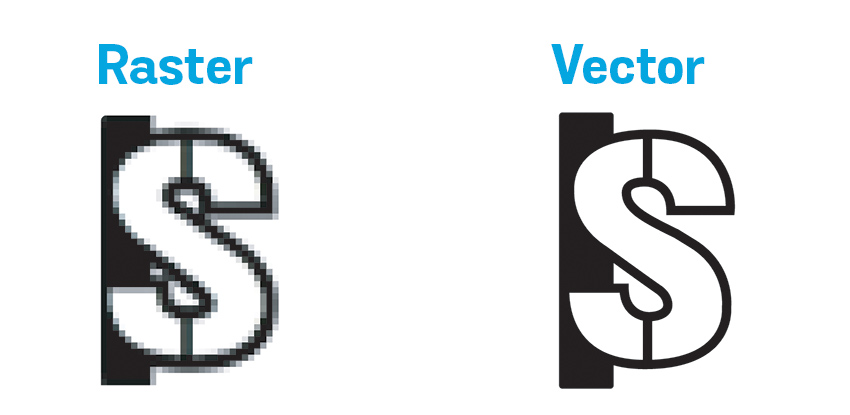
Raster files are made up of pixels that cannot be increased in size without degrading quality. Vector files are preferred as they are made up of equations making them infinitely scalable without losing quality. Raster files are OK as long as they are 300ppi at print size or larger.
Make sure to outline all fonts that are live text within your files. This ensures the fonts will appear how they were intended. Simply right click the text and hit outline, expand your file in the object menu, or create outlines in the type menu. If any edits are needed to text, please send the font file in .OTF or .TTF along with your art files.
Please provide PMS Solid Coated colors within your art file for most accurate color matching. We will convert non-PMS colors to the closest-matching PMS color. When possible, please cross-check your colors to a physical Pantone swatch book, as screen display colors may vary.
Photo-realistic and very complex images can be separated with a Simulated Process separations. Sim Process emulates a wide range of colors through the use of halftone dots while still utilizing a fixed number of spot colors. PSD source files with layers intact are preferred, but not required. Process separations can require more time and skill than a standard spot color job and may be subject to our hourly art time rate.
For the best results, please ensure that your fonts are no smaller than 8pt and lines no thinner than 1 pt. Inverse art and negative space text need even larger sizes to decorate well. It’s helpful to print your artwork out to size to ensure any small text or elements look good and remain legible from a distance.
From a sketch on a napkin, to editing a photo for screen print, OSI can bring your vision to life. If you don’t have artwork or your art is not print-ready, our team can create or re-create it for you at an hourly rate. Any artwork submitted that is not print ready may incur an hourly art charge. Learn more about our creative services.
-Deb
-George
-Josh
-Terry
If you’re new to this, that’s cool. Use these tutorials to help you prep your art.


